如何构建Claude Skills
本文是对 Claude 的 The-Complete-Guide-to-Building-Skill-for-Claude 做的笔记。
Fundamentals
Skill 主要由这几个文件(夹)构成:
- SKILL.md (required): Instructions in Markdown with YAML frontmatter
- scripts/ (optional): Executable code (Python, Bash, etc.)
- references/ (optional): Documentation loaded as needed
- assets/ (optional): Templates, fonts, icons used in output
渐进式披露 Progressive Disclosure
- 第一层 YAML frontmatter:SKILL.md顶部的 yaml 格式区域描述了skill的名字和description等,会被claude先检查
- 第二层 SKILL.md的主体:如果claude觉得第一层符合当前任务,那么会读取SKILL.md下面的主体部分
- 第三层 其他文件:如果需要,claude会读取references/, assets/等其他文件
MCP 和 Skill 的关系
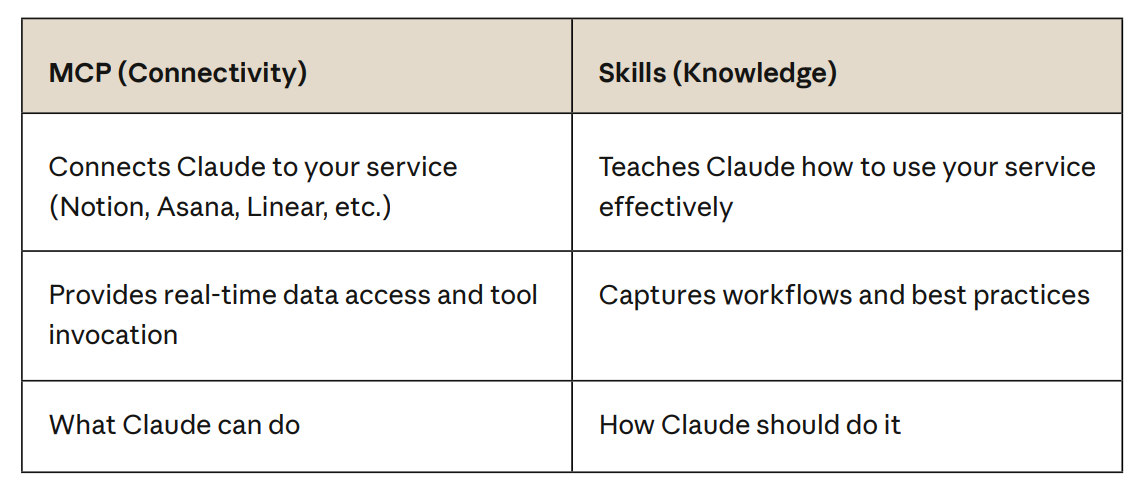
MCP 提供了工具,而Skill能告诉AI要用什么工具来自动化工作流。
Planning and design
如何设计skill。
首先思考:
- 要完成什么任务
- 需要哪几个步骤(工作流)
- 需要什么工具
- 需要什么领域知识/最佳实践
Skill文件结构
your-skill-name/
├── SKILL.md # Required - main skill file
├── scripts/ # Optional - executable code
│ ├── process_data.py # Example
│ └── validate.sh # Example
├── references/ # Optional - documentation
│ ├── api-guide.md # Example
│ └── examples/ # Example
└── assets/ # Optional - templates, etc.
 └── report-template.md # Example
文件夹里不能有README.md
SKILL.md
最小必要格式
---
name: your-skill-name
description: What it does. Use when user asks to [specific
phrases].
---
字段:
- name 必须:kebab-case only, 必须和文件夹名字匹配
- description 必须:
- 能做什么
- 什么时候触发
- compatibility 可选:描述环境要求等
- metadata 可选:描述作者等
-
  metadata:
      author: ProjectHub
      version: 1.0.0 mcp-server: projecthub
-
- license 可选:开源协议
description怎么写
格式:[What it does] + [When to use it] + [Key capabilities]
一些例子:
# Good - specific and actionable
description: Analyzes Figma design files and generates
developer handoff documentation. Use when user uploads .fig
files, asks for "design specs", "component documentation", or
"design-to-code handoff".

# Bad - Missing triggers
description: Creates sophisticated multi-page documentation
systems.
可以参考以下一些skills的实践:
Testing and iteration
这章主要讲的是如何测试和迭代你的skills。推荐使用 Skill Creator skill 生成自己的skill。
主要有三点需要测试:
- 触发时机测试
- 功能性测试
- 性能测试
触发时机测试
主要是观察skill是否在正确的时候触发,测试用例主要包括两种:不应该触发的和应该触发的用户请求。例子如下:
Should trigger:
- "Help me set up a new ProjectHub workspace"
- "I need to create a project in ProjectHub"
- "Initialize a ProjectHub project for Q4 planning"
Should NOT trigger:
- "What's the weather in San Francisco?"
- "Help me write Python code"
- "Create a spreadsheet" (unless ProjectHub skill handles
sheets)
功能性测试
验证skill是否能完成任务,主要观察:
- 输出是否正常
- API调用是否成功
- 异常处理
- Edge Case的覆盖
性能测试
非功能性比如以下几种
Without skill:
- User provides instructions each time
- 15 back-and-forth messages
- 3 failed API calls requiring retry
- 12,000 tokens consumed

With skill:
- Automatic workflow execution
- 2 clarifying questions only
- 0 failed API calls
- 6,000 tokens consumed
一个skill还是得不断迭代,针对每次出错的地方进行修改和更新instruction才能变完美。
Distribution and sharing
如何使用别人的skill以及共享自己的skill。
古法手作
- 获取:
- 从网上比如github下载skill文件夹或者压缩包
- 自己本地写
- 使用:
- 本地:skill放在当前项目/用户目录下的
.claude/skills/ - claude网页:上传到Claude.ai via Settings > Capabilities > Skills
- 本地:skill放在当前项目/用户目录下的
自动化:Plugin & Marketplace
获取和使用
Claude Code VsCode UI 里使用的话:
- 先添加Marketplaces:
show command menu -> Manage plugins -> Marketplaces -> Add - 然后添加该Marketplace中的插件:
Manage plugins -> Plugins搜索/选择你想安装的插件进行安装
分享自己的skills
搭建自己的Marketplace来分享自己的skills。
最简易的方法如下,需要保持文件夹结构一致, 其中plugins在marketplace.json中隐式地声明了(所以不需要再为每个plugin创建文件夹)。可以参考anthropics/skills。
your-marketplace/                ← 仓库根目录
├── .claude-plugin/
│   └── marketplace.json         ← Marketplace 定义(plugin 在此声明)
├── skills/                      ← 所有 skill 放这里
│   └── hello/
│       └── SKILL.md
│   └── greet/
│       └── SKILL.md
├── .gitignore
└── README.md
最重要的是 marketplace.json,格式如下
{
  "name": "obsismc-marketplace", // 你的marketplace名称
  "owner": {
    "name": "ObsisMc"
  },
  "metadata": {
    "description": "A collection of agent skills by ObsisMc, compatible with Claude Code and other Agent Skills-compatible tools."
  },
  "plugins": [
    {
      "name": "test-skills",  // 你的plugin名称
      "source": "./",         // 设置base路径
      "strict": false,
      "description": "A collection of useful agent skills",
      "skills": [
        "./skills/hello",     // 你的skill路径
        "./skills/greet"
      ]
    }
  ]
}
Push到Gitub后,别人就能用你的Marketplace了,你的skill名字最终为 /test-skills:hello。
本地测试该plugin,使用 claude --plugin-dir . 就能把当前目录加载为plugin.
完整的Marketplace搭建流程见Create and distribute a plugin marketplace
其他Tips
README写法:关注skill的产出,而非功能
✅ Good:
"The ProjectHub skill enables teams to set up complete project
workspaces in seconds — including pages, databases, and
templates — instead of spending 30 minutes on manual setup."
❌ Bad:
"The ProjectHub skill is a folder containing YAML frontmatter
and Markdown instructions that calls our MCP server tools."
Highlight the MCP + skills story:
"Our MCP server gives Claude access to your Linear projects.
Our skills teach Claude your team's sprint planning workflow.
Together, they enable AI-powered project management."
Patterns and troubleshooting
参考原文,实际遇到了再看